
Flash File Recovery
5.1
Size: 1.47 MB
Downloads: 9037
Platform: Windows (All Versions)

Corrupted images on a flash drive is a good enough reason to get upset, especially if you are a photographer. Hours of taking pictures can be wasted because of a faulty USB stick, memory card or other devices. Before deleting them, you can try to recover them. Flash Filer Recovery is the tool that can suit your needs. It will guide you through some simple steps and it will attempt to recover any damaged files.
The download is almost 1 and a half Mb large, so you can get it even if you are in a hurry. Installing it on your computer is no hard task either. Simply select a destination folder and name a Start Menu folder and the whole process will be over before you know it.
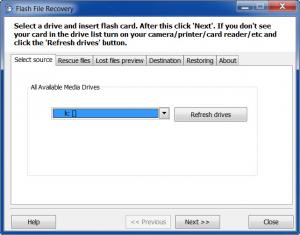
Flash File Recovery is designed like a wizard. The stages involved are placed in a logical order and you can either go through them via Next and Previous buttons or jump directly to a certain stage with the aid of navigation tabs. There are no settings to be made, no complex menus or anything else that may slow you down. All you have to do is target a damaged drive, scan, select the files for recovery and copy them to a different folder.
The whole process is very easy to perform. First, you need to select a drive from a drop menu. During the next step, you will see a results list which can be populated by clicking the Start Scan button beneath it. The final three steps involve selecting what images you want restored, setting an output path and starting the recovery process. If you want this to work, you must buy the software because the trial version will not let you start the recovery.
Pros
The software gets straight to the point when it comes to recovering deleted images or salvaging them from a damaged drive. It is a straightforward process and there is nothing that can slow you down.

Cons
The trial version lets you see how the software is used, but not how it works. The actual recovery process can not be run. Don't throw away that damaged flash drive yet. With Flash File Recovery you can still rescue your images from it.

Flash File Recovery
5.1
Download
Flash File Recovery Awards

Flash File Recovery Editor’s Review Rating
Flash File Recovery has been reviewed by Frederick Barton on 17 Feb 2012. Based on the user interface, features and complexity, Findmysoft has rated Flash File Recovery 4 out of 5 stars, naming it Excellent







